My Vertical Color Picker
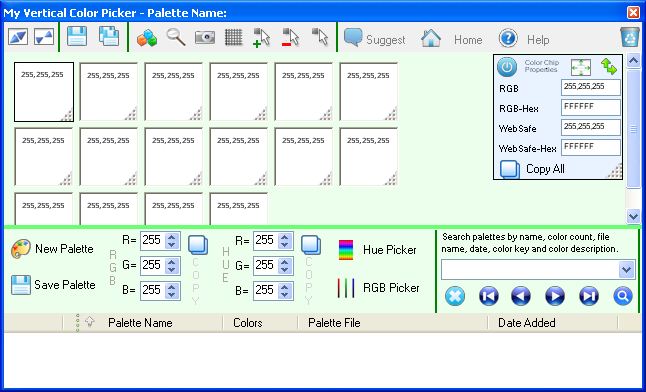
'My Vertical Color Picker' is a color picker which allows a variety of operations like selecting colors, dragging color chips around, adding text to each color chip, creating snapshots for the current palette selecting colors from your screen and many many more. There is no limit to the number of color chips you can use for a palette.

What can it do?
 grab any color from your screen
use the built-in Hue color picker and RGB color picker to easily select colors
edit the color information for a selected color chip using the R,G,B text boxes found in the application
access color chip color information at a click of a button
export palette color information and color chip color information to R,G,B, WebSafe, R,G,B-Hex, WebSafe-Hex.
build color palettes with unlimited color chips which can store color, a key and a description which you can use when searching for palettes inside the application
resize and move the color chips freely inside the application's color chip panel
create snapshots based on the current color chip position
easily add new color chips by selecting the exact region inside the color panel
search inside color palettes by palette name, color count, palette file name, color chip key and color chip description
go to Tray functionality
You can use the free version of the My Vertical Color Picker application for as long as you want.
Simply download it and install it.
My Vertical Color Picker runs on Windows XP, Vista, 7, 8/8.1, 10 and 11 - both 32 and 64 bits
 Put Images On A Path
 Draw Text On A Path
 Image Vignettes
 Image Warper, Bring Images To Life
 Animated Lake Effect
 Draw A Card From The Deck
 Math Expression Generator
 Sound of the Letters and Numbers in English
 Image Zoom, Pan, Fade In And Out
 Animated Water Effect
 Text File Search And Word Generation
 Scratchpad For Images
 xyPoint System
 Roll the Dice
 Flip The Coins
 Overlaying Shaped And Clickthrough Windows